Microsoft has added a new layer to Project Perception that can discover enterprise AI agents, assign them separate identities, recalculate their risk while they work, and reduce or remove their permissions when their behavior drifts. The company introduced Guardian Agents, Dynamic Permissions, Dynamic Agent Risk and Dynamic Conditional Access on October 19 as a response to AI tools that can be manipulated or simply make consequential mistakes at machine speed.
The controls are a substantial expansion of the Project Perception system Microsoft previewed in August. That original release concentrated on red, blue and green security agents that find, investigate and repair vulnerabilities. The new work turns Perception toward the agents already operating inside a company: coding assistants, desktop agents, workflow automations and other systems with access to files, APIs and business data.
The most useful idea is not the Guardian Agent label. It is that Microsoft wants an agent’s authority to change during a task. A suspicious agent would not always face a binary allow-or-kill decision. Policy could leave read access intact while removing write access, narrow the resources the agent can reach, require a person to approve a high-impact step, isolate its runtime or stop it entirely.
What Microsoft is adding
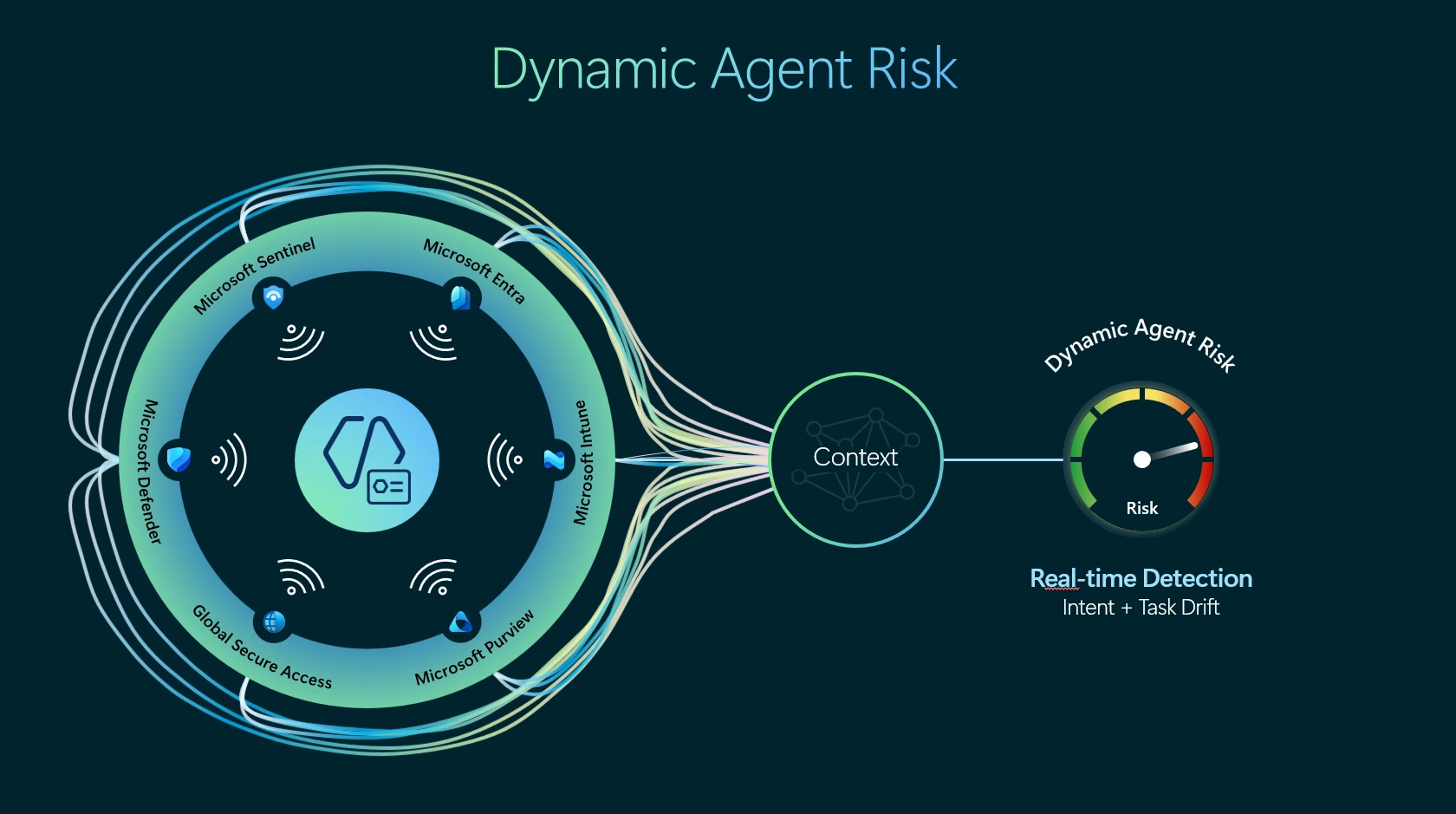
Microsoft’s security architecture connects Project Perception with Agent 365 and a shared agent registry. Signals from Entra, Defender, Intune, Purview, Sentinel, Global Secure Access, cloud services and agent activity feed a continuously updated risk assessment. Guardian Agents can investigate why that risk changed and recommend or apply containment through administrator-defined playbooks.
Agent discovery is also expanding from 25 to 60 supported local agent types. Microsoft’s current Defender for Endpoint support matrix includes Claude Code, Codex CLI and Desktop, GitHub Copilot, Cursor, Gemini CLI, Kiro, OpenCode, OpenClaw, Warp and Windsurf, along with desktop and Visual Studio Code variants. Defender can identify configured Model Context Protocol servers for some of those tools.
Discovery does not mean Defender has full control over every listed agent. Microsoft’s documentation says the inventory is activity-based: an installed tool appears only after Defender observes it running. Discovery and runtime protection are separate capabilities, and the runtime list is much shorter. Current preview protection on Windows relies on hooks for several coding agents and network inspection for a small group of desktop tools. Network inspection does not cover traffic using certificate pinning or HTTP/3.
Separate identities are the enforcement anchor
Microsoft argues that an agent should have an identity distinct from the employee who sponsors or uses it. Entra Agent ID provides that durable object, allowing administrators to attach ownership, lifecycle policy, permissions and risk to the agent rather than hiding its actions inside a person’s credentials.
That distinction matters because an agent operating with a user’s full standing access inherits a much larger blast radius than its task requires. Dynamic Permissions are designed to start the agent with no authority, then grant narrowly scoped, time-bound access for a specific job. The policy ceiling prevents the agent from receiving authority the user does not have, while a higher-impact action can trigger verified human approval.
Microsoft already documents Conditional Access policies for autonomous agent identities. Administrators can block all agents except approved identities, use custom security attributes to match approved agents with departmental resources, and put policies in report-only mode before enforcement. Risk-based Conditional Access requires Entra ID P2 or Microsoft 365 E5 when Agent 365 is purchased separately; Microsoft 365 E7 includes Agent 365 and the Entra Suite.
There is an important boundary: Conditional Access applies when an agent authenticates through Entra’s supported identity and token flows. Microsoft’s guidance notes that an agent using an API key bypasses Entra token issuance, so those policies do not govern the connection. Separate endpoint, network, data and runtime controls are still necessary.
How the mid-task response is supposed to work
Microsoft uses an expense-approval agent to illustrate the control loop. The agent begins with permission to read claims, compare them with policy and approve routine reimbursements. If it consumes an external document containing a prompt injection and then attempts an unrelated action, signals raise its Dynamic Agent Risk score.
Dynamic Conditional Access can respond without immediately ending the whole process. It might preserve read access but remove approval and write privileges, block sensitive resources, shorten the agent’s time-bound access or demand cryptographically verifiable human approval. Continued risk can trigger runtime isolation or termination.
Guardian Agents sit above that response path. People define policies, approval boundaries and delegation rules; playbooks describe the desired security outcome; Guardian Agents analyze the evidence and coordinate the containment steps. Microsoft says consequential decisions remain with people, though the system can apply actions permitted by the policy.
This is closely related to Microsoft Execution Containers, which place agent code behind operating-system-enforced file, network, process and user-interface boundaries. Identity controls decide what authority an agent receives through enterprise services. A sandbox limits what the model and its harness can do on the endpoint. Neither replaces the other.
The preview is narrower than the architecture diagram
The new features are in private preview, with broader availability planned around Microsoft Ignite in November, according to GeekWire. Microsoft 365 E7, launched in May, carries a list price of $99 per user per month. Agent 365 can also be licensed separately, but the identity, risk and Conditional Access prerequisites vary by feature.
That status should temper claims that Microsoft can already supervise every action from every enterprise agent. The discovery catalog is broad, yet enforcement depends on operating system, agent integration, authentication method and inspection path. Some tools expose hooks or MCP configuration data; others are visible only through process or network activity. Local tools can also change faster than endpoint support matrices.
Dynamic risk introduces a second set of questions. Administrators will need to know which signals raise a score, how quickly the score falls after an incident, how false positives affect long-running tasks, and whether a Guardian Agent can explain the evidence behind a containment decision. A policy that removes write access at the wrong moment could interrupt a deployment or financial workflow even if it prevents a worse outcome.
What security teams can do before broader availability
Organizations do not need to wait for Guardian Agents to reduce exposure. They can inventory local coding and desktop agents through Defender, review the MCP servers and tools those agents can reach, and separate agent identities from user identities wherever supported. Existing Conditional Access policies can begin in report-only mode, with approved agents tagged through custom security attributes.
Teams should also identify workflows in which an agent currently inherits a person’s full access, uses long-lived API keys or can perform a write action without an approval boundary. Those are the deployments least able to benefit from adaptive controls because their authority sits outside the identity system Microsoft is trying to govern.
The October release gives a concrete answer to a problem the original Project Perception preview left open. Microsoft is not proposing that companies trust a monitoring model to police another model by intuition alone. It is building an external control loop around identity, telemetry, policy and containment. Whether that loop works across a mixed estate of Microsoft, third-party and locally installed agents will depend on the coverage and operational evidence that emerge from the preview.