Google opened preorders for Googlebook on September 21, turning its Android-first laptop idea into five real machines priced from $899. Acer, ASUS, Dell, HP, and Lenovo are supplying the hardware; the first models reach U.S. stores on October 4, followed by Canada, the U.K., Ireland, France, Germany, and Australia on October 5.
The launch is not a Chromebook refresh. Googlebook OS combines an Android foundation with desktop technology from ChromeOS, so it can run Android apps beside a desktop Chrome browser, web apps, and an isolated Linux terminal. The more important buying question is whether that mix fits your work well enough to justify MacBook Air and premium Windows-laptop prices.
Googlebook prices and the best fit for each model
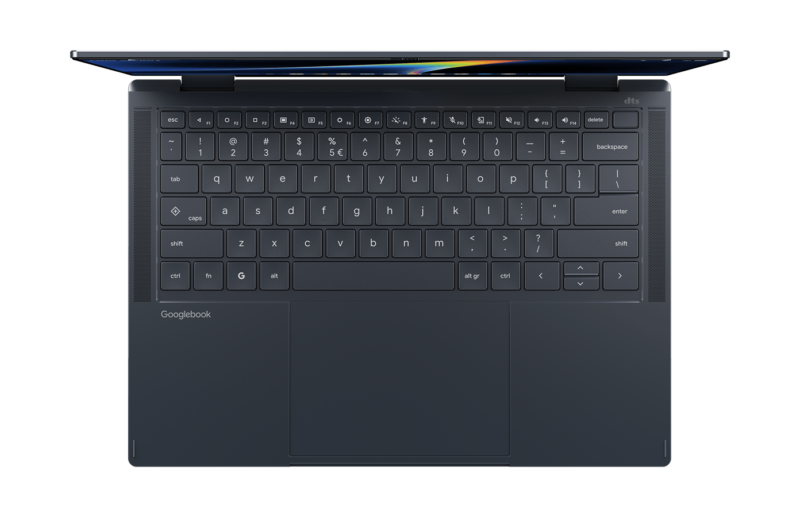
All five launch models include at least 16GB of memory, modern processors with NPUs rated at 45 TOPS or more, touch displays, a Titan C2 security module, and the distinctive Glowbar on the lid. The differences are less about raw AI specifications and more about screen size, weight, battery life, ports, and form factor.
| Model | Advertised starting price | Best reason to choose it | Main tradeoff |
|---|---|---|---|
| Acer Googlebook 14 | $899 | Lowest price and the only convertible in the launch range | Heavier than the smallest clamshell models |
| Dell XPS Googlebook | $999 | 2.2-pound design and up to 18 hours of claimed battery life | 13.4-inch IPS LCD rather than OLED; only two USB-C ports |
| Lenovo Googlebook 15 | $1,099 | Large 15.3-inch 2.8K OLED screen and the broadest built-in port selection | Up to 13 hours of claimed battery life |
| HP Googlebook 14 | $1,199.99 | 3K OLED, Snapdragon X Elite, 5MP camera, and up to 19 hours claimed | Not the lightest or cheapest Snapdragon option |
| ASUS Googlebook 14 | $1,299.99 | 2.18-pound body, 3K OLED, Intel chip, and strong port selection | Highest launch price |
Those are starting or announced prices, and retailer configurations can differ. Buyers should check the exact memory, storage, and display attached to a listing before ordering. In particular, Google Store pricing may not match the base MSRP shown on a manufacturer’s launch page.
The Acer Googlebook 14 is the obvious value pick. Its 14-inch, 2880-by-1800 OLED touchscreen folds into tablet mode, supports a stylus, and carries a 71Wh battery. At 2.51 pounds, it is still easy to carry. For most people who want to test Googlebook OS without paying four figures, this is the sensible starting point.
The Dell XPS Googlebook is the portability option. It pairs a Snapdragon X Elite processor with a 13.4-inch 2560-by-1600 touch display and weighs 2.2 pounds. Dell claims up to 18 hours of battery life. Its two USB-C ports and lack of OLED make the $999 price less generous than Acer’s, but frequent travelers may prefer its smaller footprint and longer endurance.
The Lenovo Googlebook 15 is for people who work better on a larger screen. Its 15.3-inch, 2880-by-1800 OLED panel runs at up to 120Hz, while USB-A, HDMI, an audio jack, and two Thunderbolt 4 ports reduce the need for a hub. Google lists a $1,099 starting price, though configurations and retailer pricing vary. The 2.84-pound weight is reasonable for the screen size, but Lenovo’s claimed 13-hour battery figure trails the Snapdragon systems.
The HP Googlebook 14 has the strongest video-call and battery pitch: a 5MP infrared camera, quad speakers, 3K OLED touchscreen, and up to 19 hours of claimed use. HP also lists configurations with as much as 32GB of memory and 1TB of storage. That makes it the more credible work machine for buyers whose browser tabs, Android apps, and Linux tools would crowd a 16GB system.
The ASUS Googlebook 14 is the premium lightweight choice. It weighs 2.18 pounds, has a 14-inch 3K OLED touchscreen, and includes two Thunderbolt 4 ports, two USB-A ports, HDMI, and an audio jack. Its Intel Core Ultra 5 325 processor also avoids some of the architecture questions that can accompany ARM laptops. At $1,299.99, however, buyers should demand independent battery, thermal, and app-compatibility tests before paying the premium.
What Googlebook OS actually changes
Googlebook’s central feature is not a faster chatbot. It is a tighter connection between an Android phone and a laptop. Setup can bring over saved passwords, Wi-Fi networks, settings, and messages with end-to-end encryption. Continue On resumes supported phone tasks from the laptop taskbar. The Files app can browse phone files directly, while Cast My Apps streams supported phone apps into desktop windows without installing separate laptop versions.
That continuity requires a supported phone running Android 17 or later. An older Android phone weakens the main reason to buy a Googlebook, and an iPhone leaves much of the platform’s ecosystem advantage unused.
Gemini Intelligence is woven into the desktop through three launch tools. Magic Pointer lets a user select material on screen and ask Gemini to explain, compare, translate, or act on it. Rambler turns spoken notes into formatted text. Create My Widget builds small desktop widgets from a description. Google also says Gemini can continue assigned tasks after the lid is closed, but buyers should wait for real-world testing before treating unattended agent work as a dependable feature.
App support is broad, but it is not Windows
Googlebook can run a desktop Chrome browser with extensions, Android apps from Google Play, and Linux command-line tools in an isolated virtual machine. Google highlights Android versions of Photoshop, Lightroom, CapCut, and Microsoft 365, along with a year of GeForce NOW for streamed PC games. Developers get a terminal for tools such as Claude Code and Google’s Antigravity CLI.
That combination covers many browser-heavy, creative, and development workflows, but it does not guarantee compatibility with Windows or macOS software. Specialized accounting packages, corporate VPN clients, hardware utilities, plug-ins, full desktop creative suites, and anti-cheat-dependent games should be checked individually. An Android app that works on a phone may also feel awkward with a keyboard and large display.
The Linux environment is protected by a Level 5-certified pKVM hypervisor, according to Google, and the systems receive feature and security updates for up to 10 years. That is a strong support promise. It still does not replace an employer’s approval process: companies need to verify device management, identity, endpoint security, VPN, printing, and compliance support before issuing Googlebooks.
Who should preorder, and who should wait?
A Googlebook makes the most sense for someone with a recent Android phone who spends most of the day in Chrome, Google Workspace, Android apps, or a terminal. The Acer is the safest value choice; Dell favors travel; Lenovo favors screen space and ports; HP favors battery life and higher-memory configurations; ASUS combines low weight, OLED, and conventional ports at the highest price.
Wait for reviews if you depend on professional Windows or Mac software, play locally installed PC games, use an iPhone, or need proven enterprise-management support. The launch specifications are competitive, but the platform’s value depends on phone continuity and app behavior that cannot be judged from an NPU rating.
Every model includes 12 months of Google AI Pro for eligible new users, with 5TB of cloud storage, plus time-limited app subscriptions. Google AI Pro renews at the then-current monthly price after the trial unless canceled, so the bundle should be treated as a temporary discount rather than part of the laptop’s permanent value.