Owners of four Lenovo ThinkPlus storage devices should not rely on the products’ fingerprint or password prompts until they have received Lenovo’s hardware-level remedy. The company’s LEN-210545 security advisory covers the ThinkPlus FU100, FU200 and TU800 USB drives and the TSD303 external SSD, with three vulnerabilities rated high severity.
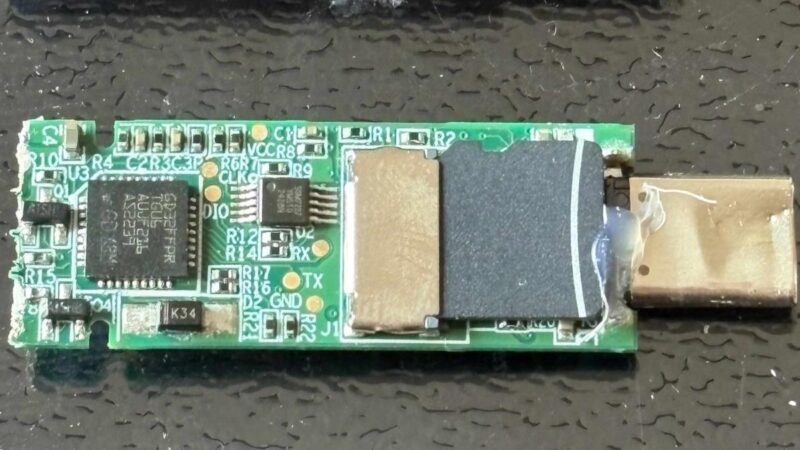
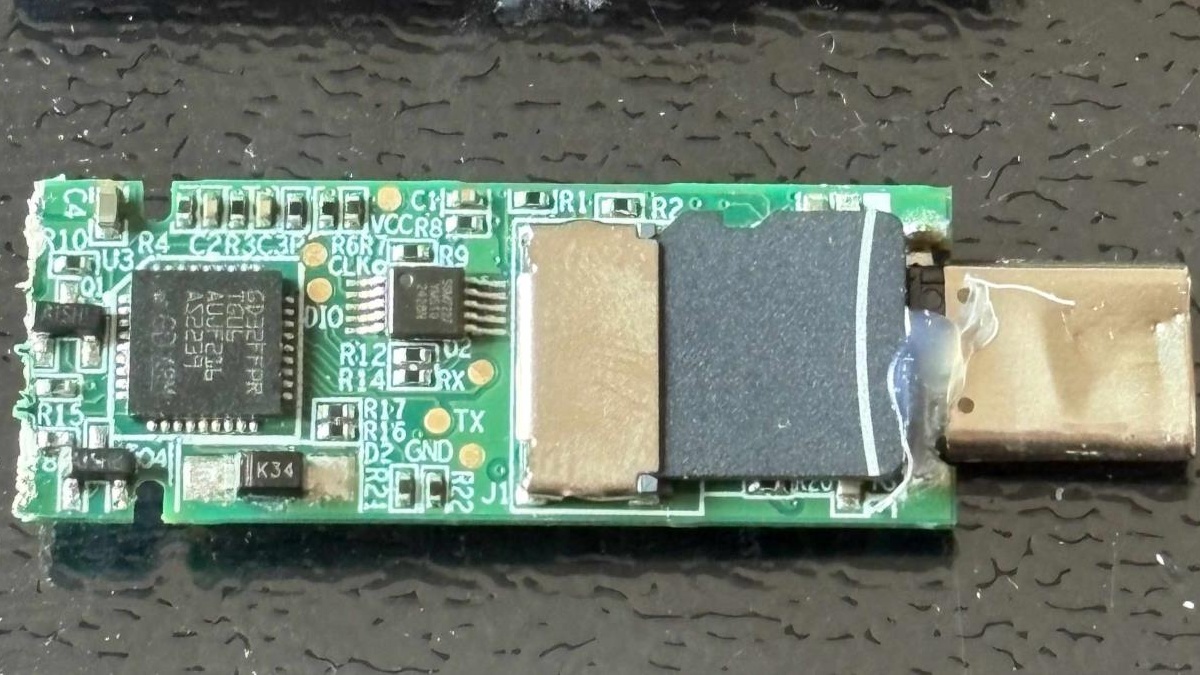
The warning is not a newly disclosed zero-day. Lenovo published the advisory in January 2026 after reverse engineer Xusheng Li reported the underlying problems in 2025. Fresh reporting this weekend has renewed attention because one of the devices, the FU100, was marketed as using AES-256 hardware encryption even though Li found an ordinary microSD card inside with readable, unencrypted data.
For affected owners, the practical response is straightforward: move sensitive files off the device, assess whether the drive has ever been lost or handled by someone else, contact Lenovo for the free upgrade or replacement, and use independent file or volume encryption before putting confidential data back on removable storage.
Which Lenovo ThinkPlus devices are affected
Lenovo lists four products in LEN-210545. The company says affected customers can request a free after-sales upgrade through its China service line at +86 400-640-1886. Lenovo will verify the serial number and arrange either a returned-device replacement or an on-site firmware upgrade.
| Product | Product type | What owners should do |
|---|---|---|
| ThinkPlus FU100 | Fingerprint USB drive | Stop treating the biometric lock as proof that stored files are encrypted; request Lenovo’s remedy. |
| ThinkPlus FU200 | Fingerprint USB drive | Check the serial number with Lenovo and arrange the free upgrade or replacement. |
| ThinkPlus TU800 | Secure USB drive | Move sensitive files, verify remediation status and apply independent encryption. |
| ThinkPlus TSD303 | Fingerprint external SSD | Update through Lenovo; earlier versions exposed the password-handling path even though the drive data was encrypted. |
Before sending a device back, Lenovo advises customers to back up important files and strongly recommends deleting or formatting all data on the drive. A normal format is useful preparation for service, but organizations handling regulated or highly sensitive information should follow their own approved media-sanitization procedure.
Why a fingerprint prompt did not protect the FU100’s files
A fingerprint reader can control access without encrypting the underlying storage. That distinction is central to the FU100 finding. Li’s teardown showed that the biometric check controlled whether the USB connection became available, while the files themselves remained on a removable microSD card in plaintext. Someone with physical possession of the drive could open the enclosure, remove or connect to the card and read its contents without satisfying the fingerprint check.
Lenovo describes CVE-2025-13453 as a flaw that may let a person with physical access read data stored on some ThinkPlus USB drives. Two related software issues widen the concern. CVE-2025-13454 can expose sensitive device information to a locally authenticated user, while CVE-2025-13455 can let a local user bypass device authentication and enroll an untrusted fingerprint.
The TSD303 failed differently. Its storage was encrypted, but Li found that an early implementation returned the correct password over USB for the companion software to compare with the user’s entry. A first attempted fix encrypted that exchange with a key derived from a predictable timestamp-like value. The later design moved password verification onto the drive so the correct password no longer had to leave the device.
This is an old advisory with a newly visible ownership problem
The weekend headlines can make the issue look like a November disclosure, but the timeline matters. Li reported the FU100 problem to Lenovo in August 2025. Lenovo’s advisory arrived on January 13, 2026, and Li discussed the work at the RE//verse conference in March. The current attention follows a detailed October account and broader coverage of his recent AI-assisted reverse-engineering research.
There is no public evidence in Lenovo’s advisory or the research that attackers have exploited these flaws against owners. The risk is nevertheless concrete for a lost, stolen, borrowed or serviced drive because the FU100 weakness does not require a remote attack. Physical possession is the central condition.
What affected owners should do now
- Identify the exact model. Check the device body, packaging, receipt or companion software for FU100, FU200, TU800 or TSD303. Do not assume a similar-looking ThinkPlus drive is covered by the same advisory.
- Move confidential data. Copy sensitive files to approved, encrypted storage before troubleshooting or arranging service. Keep an independent backup and verify that it opens.
- Review the drive’s history. Treat any period when the device was lost, shared, repaired or left unattended as a possible exposure window. The presence of a working fingerprint prompt does not prove the files stayed unreadable.
- Contact Lenovo. Use the support route in LEN-210545 and have the serial number ready. Ask whether the unit needs replacement, an on-site firmware update or another hardware-level remedy.
- Sanitize before service. Follow Lenovo’s backup and wipe guidance. Businesses should use their formal removable-media disposal or sanitization process rather than relying only on dragging files to the Recycle Bin.
- Change exposed secrets. If the drive held passwords, API keys, private keys, recovery codes or unencrypted credential exports, rotate them. Deleting the original file does not undo earlier access.
Add encryption that does not depend on the drive’s fingerprint reader
On supported Windows editions, BitLocker To Go can encrypt USB flash drives, SD cards and external hard drives. The removable volume is unlocked with a password or smart card, and its recovery key should be stored somewhere other than the drive itself. Windows Device Encryption on a PC does not automatically encrypt external USB media, so owners need to protect the removable drive separately.
For mixed Windows, macOS and Linux workflows, an independently audited encrypted container or per-file encryption tool may be a better fit. The important design property is that the decryption key depends on a secret the attacker does not have. A fingerprint sensor, password window or hidden partition is not enough if the underlying files remain readable or the application contains the same key for every user.
After enabling encryption, test the result on another computer before trusting it. The drive should show encrypted data or refuse access until the password or recovery material is supplied. Keep a verified backup: encryption protects confidentiality, but it does not protect against flash-memory failure or a lost recovery key.
What IT teams should change
Organizations should inventory removable storage by model and serial number, not just by brand. Any affected ThinkPlus device used for customer records, source code, financial files, legal documents or administrator credentials deserves an exposure review and replacement decision.
Windows administrators can also require BitLocker protection for removable media and block writes to unencrypted drives through Group Policy or Intune. Microsoft’s removable-drive controls support password rules, recovery settings and a policy that prevents users from writing data until the device is protected. Those controls make encryption status visible to the operating system instead of trusting a vendor utility or a biometric badge on the enclosure.
Future purchasing checks should ask where authentication occurs, whether the data-encryption key ever leaves the device, how recovery works, whether the product has independent certification and what happens if the storage component is removed from its case. “AES-256” describes an algorithm; it does not prove that a product uses it correctly, protects its keys or encrypts every byte written to the drive.