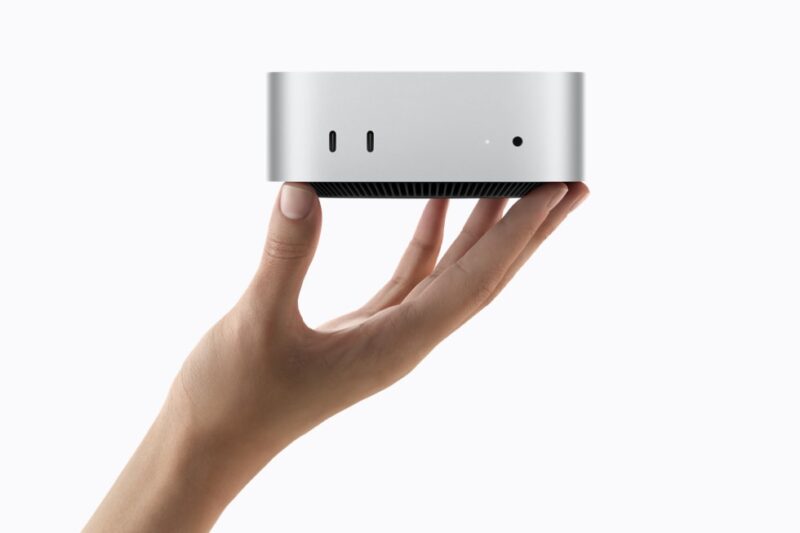
Apple announced new Mac mini and Mac Studio desktops on Tuesday, August 25, putting its next wave of Apple silicon squarely behind local AI work. The Mac mini now ships with M6 or M5 Pro, while the Mac Studio moves to M5 Max and M5 Ultra. Preorders opened immediately, with availability beginning September 22.
The launch is not just a routine Mac refresh. Apple is selling the new desktops as local AI machines: small systems that can run language models, image tools, creative workflows, and AI agents without sending every request to a cloud model. That framing matters because the buying decision for a desktop Mac is starting to look less like a simple CPU-and-storage upgrade and more like a choice about where AI work should run.
The entry point is now the M6 Mac mini, which starts at $899 in the United States. Apple says M6 gives the machine a 12-core CPU, 12-core GPU, GPU Neural Accelerators, and a Dual 16-core Neural Engine. The company claims up to 4x faster AI performance and 2x faster graphics compared with the M4 Mac mini, with unified memory starting at 16GB and configurable to 32GB.
Why the M6 Mac mini is more than a small desktop update
The most useful change in the M6 Mac mini is not one benchmark number. It is the way Apple has moved AI acceleration into more parts of the chip. Neural Accelerators in the GPU give local model workloads another path besides the Neural Engine, while the higher memory bandwidth gives the system more room to keep models and application state close to the processor.
Apple’s own examples are broad but revealing. The company cites faster LLM prompt processing in LM Studio, spreadsheet calculations in Excel, and ray-traced gaming performance compared with older Mac mini systems. Those are different workloads, but they point to the same hardware bet: a compact desktop should be able to sit on a desk, stay quiet, and handle bursts of local inference without needing a discrete GPU tower or a cloud endpoint for every task.
For everyday buyers, the M6 Mac mini is most interesting when the work is local but not enormous: running smaller open-weight models, coding assistants, document analysis, photo edits, background automation, or an AI helper that watches a limited workspace. It is also a cleaner fit for homes, schools, and small offices that want a stationary Mac with better connectivity than a laptop dock.
The limit is memory. A 32GB ceiling gives the M6 Mac mini room for many practical local AI tasks, but it is not a substitute for a high-memory workstation. Larger models, heavier multimodal pipelines, and teams trying to keep several agents or creative applications alive at once will hit that boundary quickly.
M5 Pro and Mac Studio are the real local-AI fork
The M5 Pro Mac mini is the first step up for people who need more than a compact consumer desktop. It can be configured with up to an 18-core CPU, up to a 20-core GPU, and up to 64GB of unified memory. Apple says the M5 Pro model also brings Thunderbolt 5, which matters for fast storage, high-end displays, expansion chassis, and clustering experiments.
That M5 Pro tier is where the Mac mini becomes a serious local-AI developer box rather than a general-purpose desktop with better AI acceleration. It gives more breathing room for local coding agents, diffusion tools, video upscaling, datasets, and creative apps that need memory as much as raw compute.
The Mac Studio pushes that idea much further. The M5 Max version starts at $2,499, and the M5 Ultra version starts at $5,499. Apple says M5 Max supports up to 128GB of unified memory, while M5 Ultra supports up to 512GB, with the 512GB configuration arriving in late October. M5 Ultra also brings up to a 36-core CPU, up to an 80-core GPU, 1.2TB/s of memory bandwidth, and up to 4.3x peak AI compute performance compared with M3 Ultra.
That memory number is the Mac Studio’s central AI argument. Many local AI workloads are constrained less by peak arithmetic than by whether the model, context, and supporting tools fit in memory. A 512GB unified-memory Mac Studio is expensive, but it gives researchers, creative studios, and some enterprise teams a way to run much larger open-weight models locally than a consumer PC or ordinary Mac can handle.
Clustering Macs is promising, but still a specialist path
Apple is also talking more openly about clustering desktop Macs for AI. The company says Thunderbolt 5 and RDMA support can let multiple Mac Studio systems share AI compute, and claims a four-system cluster can deliver up to 3x faster AI inference than a single system. The M5 Pro Mac mini also supports Thunderbolt 5, and Apple says multiple Mac mini systems can be clustered to run large AI models entirely on device.
That is technically meaningful, but it should not be confused with a plug-and-play replacement for cloud AI infrastructure. Local clusters still require software support, model compatibility, cooling, power planning, storage design, monitoring, and a clear reason to keep inference on premises. For some teams, privacy, predictable latency, or avoiding token-based cloud costs may justify the setup. For many others, cloud GPUs and hosted model APIs will remain easier to scale and easier to manage.
The interesting part is that Apple is now giving developers an official story for this category. Its broader M6 and M5 Ultra announcement points to Core AI, MLX, Xcode, Apple Foundation Models, App Intents, and custom local models as parts of the Mac AI stack. In other words, the company wants AI developers to treat Mac hardware, macOS frameworks, and Apple silicon memory architecture as one platform.
The practical buying question
For most people, the new Mac mini is the cleaner story. The M6 version is the obvious pick for general desktop use, light creative work, browser-heavy productivity, and smaller local AI tools. The M5 Pro version is better for developers, creators, and small teams who need more memory, Thunderbolt 5, and room for heavier workflows.
The Mac Studio makes sense when the machine is being bought for paid work that can justify the price: video production, 3D rendering, software builds, research, local model testing, or privacy-sensitive AI pipelines. Its strongest case is not that every AI workload belongs on a desk. It is that some workloads should not have to leave the desk at all.
The main caution is that Apple’s AI claims come from Apple’s own testing on specific systems and preproduction hardware. Buyers should wait for independent benchmarks if the purchase depends on a particular model size, prompt speed, creative app, or agent workflow. On-device AI is becoming a real desktop category, but it is still a workload-by-workload decision.
Apple’s new Macs make that decision more visible. The M6 Mac mini gives local AI a lower-cost desktop entry point. The M5 Pro Mac mini adds enough memory and I/O for more ambitious work. The M5 Ultra Mac Studio is the version for people who already know why a high-memory local AI workstation is worth more than another cloud bill.