Microsoft has begun rolling out Copilot Studio agent accounts through its Frontier preview, giving a business agent its own Microsoft Entra user identity, mailbox, directory profile and presence in Microsoft Teams. The feature, announced October 15, lets an agent receive email, join distribution lists, respond to Teams mentions and continue a shared process without borrowing the maker’s credentials.
The shift is more consequential than adding another place to chat with Copilot. An agent account makes software look and act more like a colleague inside Microsoft 365, while creating a new identity that administrators must license, permission, monitor and eventually retire. Microsoft’s current documentation also exposes important preview limits, including shared memory with no per-user privacy boundary and incomplete Microsoft Graph support.
What Microsoft is launching
Agent accounts are available now to tenants enrolled in Microsoft’s Frontier program and using Copilot Studio Preview in an early-release Power Platform environment. According to Microsoft’s product announcement, the accounts are designed for persistent business processes rather than one-off conversations.
Once published, an eligible agent can have its own email address, receive and send messages, appear in the company directory and be mentioned in supported Teams, Outlook and Office-comment scenarios. Microsoft is pairing that identity with triggers in the GitHub Copilot harness, allowing an email or schedule to start work without a new human prompt.
This is still a preview, not a blanket Microsoft 365 rollout. Microsoft’s roadmap lists general availability for November 2026, while the detailed documentation says capabilities and availability can change. A tenant needs Frontier enrollment, an eligible maker license, the early release cycle and an available Microsoft 365 Frontier for AI Teammates license for each account.
One agent can involve two Microsoft Entra identities
The naming is easy to blur, but the distinction matters during access reviews and incident response.
Every new Copilot Studio agent receives a Microsoft Entra Agent ID, which Microsoft describes as a service principal with an “Agent” subtype. That identity supports authentication to channels and services and gives administrators a distinct object to locate in the Entra admin center. Agents created before Microsoft introduced Agent IDs in May 2026 can continue using legacy app registrations until a future migration.
An agent account adds a separate Microsoft Entra user account. That second identity is what gives the agent user-like Microsoft 365 resources such as a mailbox and Teams presence. Microsoft calls this runtime pattern “Agentic-User”: the user account is the acting user, while the Agent ID remains the registered agent identity.
The same agent can use other execution modes. In service-to-service mode, the Agent ID is the token subject for background processing with application permissions. In on-behalf-of mode, a signed-in person is the subject and the agent is the actor. Administrators therefore cannot infer the effective permission path from the agent’s friendly name alone. They need to check which identity and execution mode each tool uses.
The account does not grant every tool access
Giving an agent an account creates an identity; it does not automatically authorize every connector, file or API operation. Microsoft’s setup guidance tells makers to configure the required connections and consent separately. Tools that support agent accounts can use the agent as their default authentication mode, while tools configured for end-user authentication still require each person to authenticate.
That makes the first deployment question concrete: does a step need the agent’s own standing access, a user’s delegated access, or an application permission with no user context? A recurring reconciliation process may need its own mailbox but should not automatically inherit broad access to every finance site. A support agent may need to act for the person in chat rather than read the agent mailbox. Each path produces a different token subject and audit trail.
Microsoft recommends adding a user account only when an agent actually needs user resources. Agents that primarily call tools or emit telemetry can operate without one. For custom deployments, the company also advises treating an identity blueprint as a credential boundary because agents created from the same blueprint can share credentials and baseline permissions.
Shared memory is the sharpest preview risk
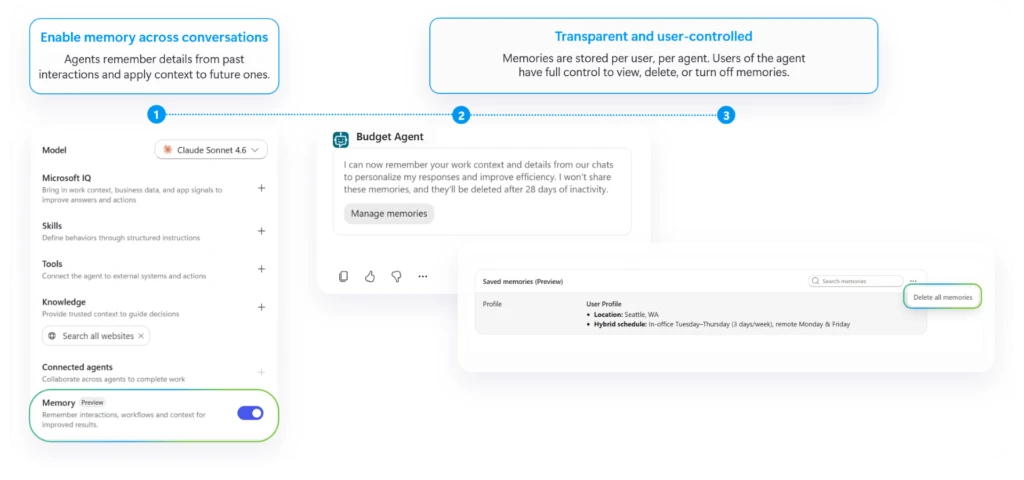
Business process memory lets an agent retain workflow rules, terminology, preferences and unresolved context across later interactions. For a team process, that can eliminate repeated briefings. It also changes the confidentiality model.
Microsoft states that an agent account uses one shared memory across everyone who works with it, including in one-to-one chats. A fact supplied by one person can influence a later response to someone else. The system is instructed not to reveal one person’s details to another, but Microsoft’s documentation is explicit that shared memory has no privacy boundary between users in the preview. Users cannot opt out while continuing to use the feature.
The People card and first conversation display a warning that shared files or chats may be summarized into memory and later appear in responses to users who could not access the original material. That is a stronger exposure model than ordinary document permissions, so pilot teams should treat every interaction as shared process input and avoid personal, privileged or need-to-know information.
Protected documents remain blocked. Agent accounts cannot read files protected by labels such as Confidential or Internal Only. Microsoft warns administrators not to weaken sensitivity labels merely to make a test work; use approved non-sensitive samples instead.
Current limits rule out several obvious workflows
The preview can generate a new document, but it cannot yet co-author an existing document or make targeted edits through an Office comment. External users cannot interact with the agent at all. Email conversations are limited to audiences of up to 250 people, and not every Microsoft Graph operation or permission scope is supported.
Identity details also require planning before publication. During the preview, the maker-based email alias prefix and reporting relationship cannot be changed, and the agent’s email address becomes fixed after the first publish. Publishing fails if the tenant has no available AI Teammates license.
Activity data introduces a separate residency consideration. Microsoft says historical activity maps and transcripts are stored in the geographic region of the end user’s Exchange mailbox, regardless of the Copilot Studio environment’s selected geography. That data is governed by Microsoft 365 terms and residency commitments rather than Azure compliance settings.
An admin checklist before enabling agent accounts
- Choose a narrow process. Start with an internal workflow whose inputs, outputs, reviewers and stopping conditions are already understood.
- Name a human sponsor. Microsoft associates an owner or sponsor with agent identities for lifecycle accountability. Make that person responsible for access reviews and retirement decisions.
- Map every identity. Record the Agent ID, the agent’s user account, its mailbox, the maker, its blueprint where applicable and each connector identity.
- Assign least privilege by operation. Decide whether each action should run service-to-service, on behalf of a person or as the agent’s own user account.
- Define memory-safe inputs. Exclude personal, privileged and restricted material from a shared-memory pilot. Do not rely on chat context as an access boundary.
- Test protected-content failures. Confirm that labeled files remain unavailable and that the workflow stops cleanly rather than asking users to downgrade protection.
- Monitor sign-ins and actions. Baseline the agent’s expected hours, resources, Graph calls, mailbox activity and trigger cadence so anomalous behavior has something to be compared against.
- Set cost and license owners. The account license and usage-based Copilot Credits are separate costs. Publishing, testing and evaluation can consume credits.
- Write a retirement runbook. Include triggers, connections, mailbox retention, distribution-list membership, stored memory and dependent workflows, not only deletion of the visible agent.
What this changes for Microsoft 365
Copilot Studio agents were already able to call tools and answer inside Microsoft 365. Agent accounts make them durable organizational actors: addressable by email, visible in directories and capable of continuing work across a team’s normal communication channels.
That can solve a real operational problem. A budget-review agent, for example, can collect status updates, prepare a new review document and ask named reviewers for missing context on a schedule. But the same persistence means the agent must be managed more like a service identity and a user account at once. The right pilot is not the process with the most data or authority. It is the one whose access can be constrained, whose memory can be safely shared and whose output always has an identifiable human reviewer.
Sources: Microsoft Copilot Blog; Copilot Studio agent account documentation; Copilot Studio identity documentation; Microsoft Agent 365 identity guidance.