Microsoft’s Work IQ APIs are generally available today, June 16, turning the context layer behind Microsoft 365 Copilot into an API surface for custom and third-party agents.
The launch matters because it gives developers a sanctioned way to let agents use workplace context from Microsoft 365 without building their own retrieval stack over email, calendars, meetings, chats, files, people, and business systems. It also gives IT teams a new governance problem: once agents can search, reason, store intermediate work, and take actions inside a tenant, access policy and cost controls become part of the agent rollout, not an afterthought.
Microsoft announced the June 16 general availability date at Build earlier this month. The company describes Work IQ as the workplace intelligence layer behind Microsoft 365 Copilot, built from the semantic relationships among messages, documents, meetings, organizational structures, collaboration patterns, and line-of-business systems. The APIs expose that layer so agents can work with business context instead of only raw search results or disconnected files.
What Work IQ Opens Up
Work IQ is not just another connector for Microsoft 365 data. The more important shift is that Microsoft is packaging organizational context in a form meant for agents. Instead of forcing a developer to pull messages, parse file metadata, resolve people relationships, and stitch together meeting context in a separate orchestration layer, Work IQ can return agent-ready context or a Copilot-quality answer with citations.
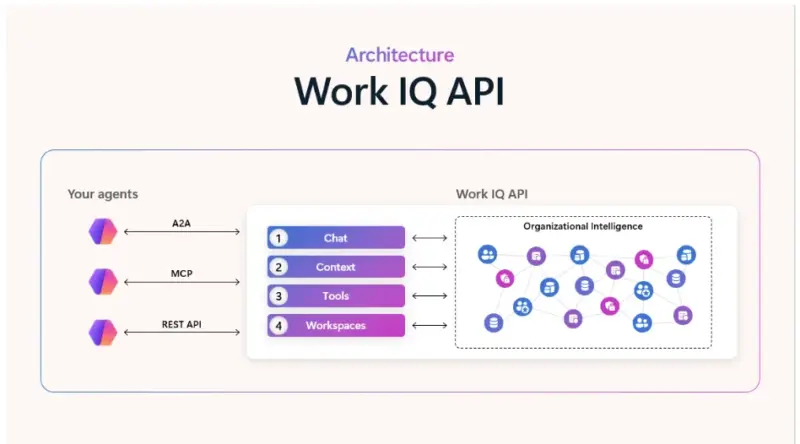
The API architecture is built around four domains. The Chat API gives programmatic access to the kind of response Microsoft 365 Copilot would return to a user, including citations and access to agents in Copilot. The Context API returns the underlying context without synthesizing it into a final answer, which is useful when a separate agent needs grounded inputs for its own workflow. The Tools API gives agents a smaller set of verbs for Microsoft 365 entities and actions, such as sending email, scheduling meetings, and uploading documents. Workspaces give long-running agents a place to store memory, intermediate files, progress, and outputs inside the Microsoft 365 tenant boundary.
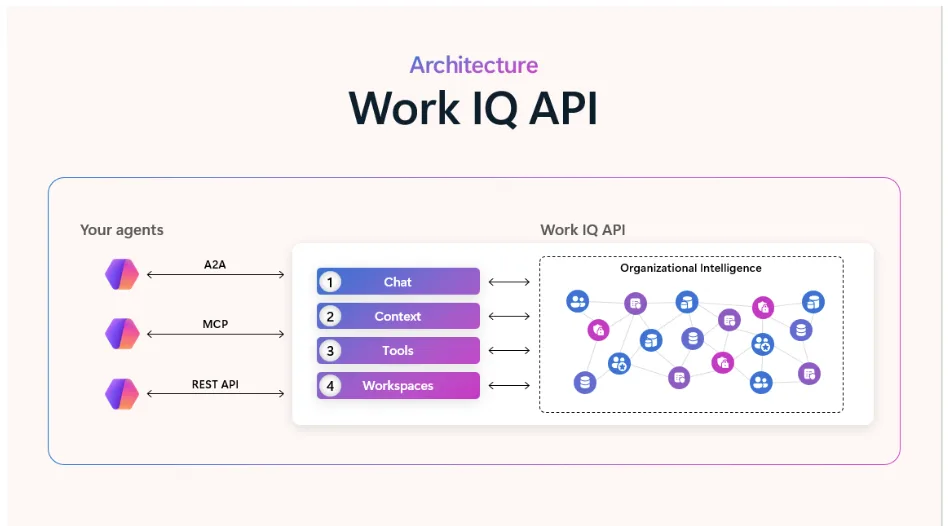
For developers, the notable detail is the smaller tool surface. Microsoft says Work IQ’s MCP implementation collapses hundreds of operations into 10 generic tools, with resource paths defining the scope of work. A capability called getSchema lets agents discover data structure at runtime, so an agent can adapt to new sources or evolving data models without a custom integration for every object type.
That is a different design philosophy from older enterprise APIs, which often made software teams model every service, permission, and endpoint directly. Work IQ is closer to an agent operating layer: fewer tools, richer context, and more platform-level interpretation before the agent sees the result.
Why The Pricing Change Matters
The general availability launch also brings a clearer billing model. Microsoft says Work IQ API usage is consumption-based and uses Copilot Credits, the same consumption currency used across Copilot Studio and other Microsoft AI services. There is no separate Work IQ API subscription, SKU, or per-user license for the API itself.
That does not mean Work IQ is free for every agent. Microsoft lists two kinds of charges: variable consumption for query-style use through Chat and Context, and a static component for tool calls. The licensing page lists Work IQ Tool API calls at 0.1 Copilot Credits per API call, while sample Chat and Context scenarios range from about $0.20 to $1.50 per call depending on complexity. Microsoft labels those examples illustrative rather than fixed rates.
The practical consequence is that agent design now has a direct cost shape. An agent that frequently grounds every answer in meeting transcripts, email threads, and files may be useful, but it will also draw down credits. A workflow that uses many small tool calls can create a different cost profile. Developers will need to think about retrieval depth, caching, tool call discipline, and user-facing limits in the same way cloud teams already think about tokens, storage, and compute.
Microsoft is pairing the launch with cost management in the Microsoft 365 admin center. Administrators can configure Copilot Credit billing, spending limits, tenant or group controls, and alerts. For organizations using Work IQ through custom agents in Copilot Studio, Microsoft Foundry, or third-party platforms, Microsoft tells partners that administrators should enable consumptive billing and configure access policies before deployment.
The Governance Question
The strongest argument for Work IQ is that it keeps agent context and workspaces inside the Microsoft 365 trust boundary. Microsoft says agent actions are auditable and discoverable, and the developer blog describes Work IQ operations as user scoped, meaning requests run in the context of a specific user and should only access what that user is allowed to see or do.
The developer implementation goes beyond broad OAuth scopes. Microsoft’s Work IQ developer post describes a small set of high-level permissions paired with a Rego-based policy engine that can evaluate resource paths, request methods, user identity, and data content on each request. Tool invocations are logged and evaluated for auditability, analytics, rate limiting, and compliance enforcement.
That model is important because agents do not behave like ordinary users clicking through apps one action at a time. A useful agent may scan a calendar, summarize related documents, find the right people, draft an email, update a workspace, and call another agent. The more continuous and multi-step the workflow becomes, the more dangerous it is to rely on a one-time consent screen or a broad app permission.
There is still a gap between having controls and deploying them well. Work IQ can make context safer to expose, but it will not automatically decide which departments should be allowed to run third-party agents, which data classes should be blocked from agent retrieval, how long intermediate work should live in workspaces, or who reviews logs when an agent takes an unexpected action.
What Teams Should Check Before Rollout
The first check is licensing and billing. Organizations using only Microsoft 365 Copilot’s built-in agents may have Work IQ covered through licensing, but custom and third-party agents grounded in Microsoft 365 data can trigger Copilot Credit usage. Admins should confirm who can create or connect those agents, which payment method is active, and what alerts stop experimentation from becoming an unnoticed bill.
The second check is data scope. A team building an agent for sales follow-ups probably does not need broad access to every SharePoint site or every mailbox context in the tenant. Work IQ’s promise is strongest when developers can narrow resource paths, use policies, and keep actions tied to the person or workflow that actually needs them.
The third check is observability. Enterprises should treat Work IQ tool calls as production events, not background AI magic. Logs should answer which agent acted, whose permissions it used, what data it touched, which tool it invoked, and whether the result left the tenant or stayed in a managed workspace.
The fourth check is workflow design. Developers should decide when an agent needs a Copilot-style answer, when it only needs context, when a tool call is justified, and when a human approval step should interrupt the workflow. The API launch makes richer workplace agents easier to build, but the useful ones will be the agents that ask for less access, make fewer unnecessary calls, and leave a clearer trail.
Microsoft Is Making Context The Platform
Work IQ fits into a wider Microsoft Build push around Microsoft IQ, Fabric IQ, Foundry IQ, Web IQ, Agent 365, and Scout. The common idea is that models alone are not the enterprise AI platform. The platform is the layer that gives agents relevant context, safe execution, policy enforcement, and a place to work.
That framing is self-serving for Microsoft, but it also reflects where enterprise AI is heading. Companies do not just want a smarter chatbot. They want agents that understand the messy structure of work and can act without scattering data across unmanaged integrations. Work IQ’s general availability gives Microsoft a stronger answer to that demand, while putting a new responsibility on customers: treat agent context as infrastructure, with the same seriousness as identity, logging, and cloud spend.