Anthropic has begun rolling out Personal Finance in Claude, a beta that lets U.S. subscribers connect bank, credit-card, loan and investment accounts and ask questions about their own money. The feature can combine balances and transactions into spending summaries, cash-flow views, subscription lists and bill calendars, but it also gives Claude access to a substantial financial record: up to two years of transaction history from every account a user chooses to share.
The new hub is arriving on Claude Pro, Max and Ultra accounts across the web, desktop and mobile apps. It is read-only, uses Plaid for account authentication and cannot move money, trade investments or manage an account. Those boundaries reduce the immediate risk, but they do not make the connection trivial. Account-derived figures can remain in chat history, artifacts and shared links after a bank is disconnected.
Here is what Personal Finance can see, where its answers can go wrong and which settings deserve attention before linking an account.
What Claude Personal Finance actually reads
Users sign in to their financial institution through Plaid rather than handing a bank password to Anthropic. During setup, Plaid asks which accounts to share. Claude can then receive the bank name; account name, type and last four digits; balances and credit limits; and as much as 24 months of transaction data. Transaction records can include the amount, date, merchant, category and the description supplied by the bank.
Anthropic says Claude does not receive full account numbers through the normal Plaid connection. There is an important exception: if a bank puts a full number inside an account name or transaction description, that text can pass through with the rest of the record.
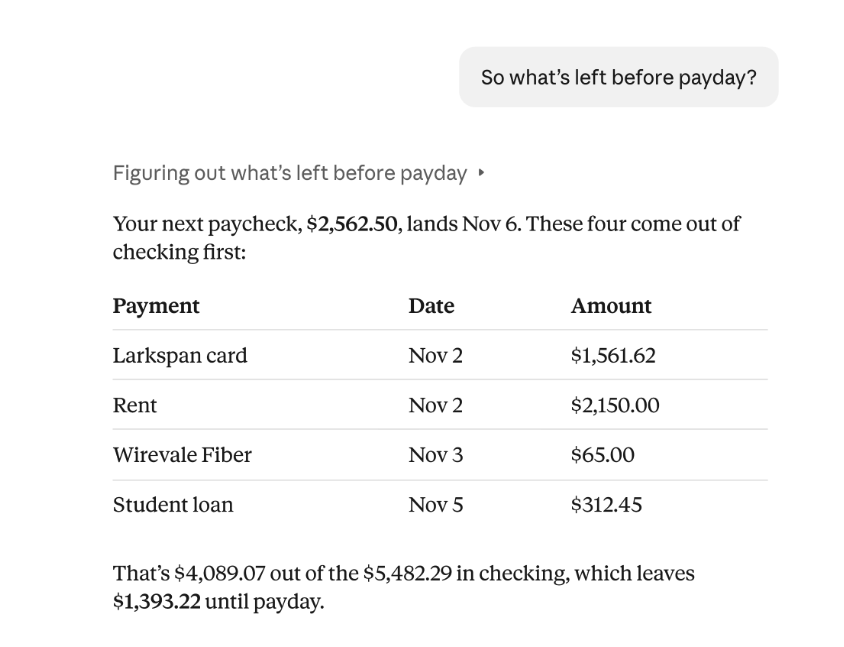
The beta supports up to 16 U.S. banks. It can assemble customizable widgets for spending, cash flow, accounts, subscriptions and upcoming bills. Users can ask questions such as which subscriptions they are paying for, whether a category is running above its normal level or how much money is likely to remain before payday. Claude can also create charts, calendars, dashboards and plain-text CSV files from the connected data.
Read-only access does not prevent every privacy mistake
Claude cannot initiate a transfer or investment from Personal Finance, and Anthropic says conversations inside the dedicated Personal Finance hub are not used to train its models. The company uses connected financial data to answer the user’s requests, while its hosting providers also handle that data. Information shown in a conversation remains in chat history until the user deletes the chat, subject to Anthropic’s retention practices.
Chats that use connected accounts are designed to stay out of Claude’s memory, search and monthly recap. That separation is useful, but it does not cover everything a user can deliberately create or share.
A shared chat link can expose the user’s messages, Claude’s answers and any account-derived figures or charts in the conversation. An artifact published from the chat can contain financial information and can remain available after the original conversation is deleted. Anthropic says Claude asks for confirmation before publishing such an artifact, but users still need to inspect it carefully. Figures saved inside an artifact are visible to everyone who opens it.
Unlinking a bank stops future reads; it does not erase text that Claude already placed in chats, artifacts or shared links. Those items have to be removed separately. Users can disconnect Claude either inside the Personal Finance account manager or through their Plaid account at my.plaid.com.
Claude’s totals can be stale, incomplete or doubled
Anthropic explicitly warns that Personal Finance is not designed to give investment advice and that Claude can make mistakes. The underlying account feed can also introduce errors that have nothing to do with the model’s arithmetic.
A balance may lag the bank by a day or two. A bank that temporarily stops syncing will disappear from current calculations, which can make a budget look healthier than it is. Linking the same account through two different bank logins can count it twice. Merchant categories and transaction descriptions can also be inconsistent, particularly for payment services, transfers and pending charges.
For any important number, ask Claude to identify the transactions behind it and then compare the result with the bank’s own app or statement. The most reliable uses are organizational: finding recurring charges, reviewing category trends, building a bill calendar or collecting transactions for closer inspection. A model-generated balance should not be the final check before paying a bill, moving money or making an investment decision.
Five checks before connecting a bank
- Start with one low-complexity account. Link a checking or credit-card account first, confirm how transactions are categorized and inspect what Claude displays before adding investments, loans or additional banks.
- Share only the accounts needed for the question. Plaid lets users select accounts during authentication. A narrow connection reduces how much data enters Claude and makes incorrect totals easier to spot.
- Control Plaid access in ordinary chats. Claude can read linked accounts in regular conversations without asking each time unless the connector setting is changed. On the web and desktop app, open the plus menu, choose Connectors and switch Plaid off. Mobile users can set the connector to Blocked or Needs approval.
- Inspect chats before sharing them. Treat a shared link or published artifact like a financial document. Review messages, tables, charts and generated files for balances, merchant names, dates and other identifying details.
- Plan the exit before canceling a paid plan. If a subscription ends, Claude can no longer read the accounts, but the bank links remain in place. Anthropic recommends unlinking them first. If the Personal Finance page is no longer available, remove the Plaid connector through Claude’s settings or disconnect it from Plaid directly.
How to set up Claude Personal Finance
Open Personal Finance from Claude’s side menu and select Get started. After an optional goals screen, choose Link accounts with Plaid, review the requested access, sign in to the bank in Plaid and select the accounts to share. The authentication step must be completed within 10 minutes. New transactions can take several minutes to appear.
If the feature is missing, confirm that the Claude app is current, the account is a personal Pro, Max or Ultra subscription and the connection appears to come from the United States. The gradual rollout means eligible users may not receive it immediately. It is not available to Team or Enterprise accounts, in Claude Duet or for scheduled tasks, Cowork tasks and Claude Code.
The dedicated hub is a more coherent money dashboard than pasting statements into a general chatbot, and its read-only design draws a useful line around what the model can do. The tradeoff is breadth: two years of itemized transactions can reveal income, debts, health-related purchases, travel patterns, subscriptions and daily routines. Connecting that record should be a deliberate decision, not just another app permission.
Sources: Anthropic’s product announcement and Claude Personal Finance documentation.