ConnectWise has suspended Cloud Backup and disabled seven application identities after attackers used trusted vendor credentials to enter Microsoft 365 customer tenants. The company said its investigation remains active, scheduled backups are not running, and affected archives cannot currently be accessed or restored.
The incident is not limited to a stolen password. Security researchers observed app-only Microsoft 365 access that bypassed user sign-in controls, and in one tenant a ConnectWise application elevated itself to Global Administrator before adding new client secrets to two other trusted applications. Those added credentials can survive the original vendor credential being revoked.
ConnectWise’s October 18 advisory says the company disabled the seven identities at 07:00 UTC on October 17 and revoked certificates used by affected Cloud Backup connections. It has not published a restoration time. Existing backup archives remain encrypted and preserved, with no evidence so far that attackers accessed them, but new and changed Microsoft 365 data is not being backed up during the interruption.
What happened to ConnectWise Cloud Backup
Cloud Backup, formerly SkyKick Backup, operates as a multi-tenant Microsoft 365 application. A customer administrator grants the app permission to reach services such as Exchange Online, OneDrive, SharePoint and Teams. The vendor then authenticates the app with a credential held on its side.
That design explains both the service’s reach and the incident’s severity. Todyl’s investigation found that the actor presented the app’s credential through the OAuth 2.0 client-credentials flow. Microsoft Entra ID issued app-only Graph tokens carrying permissions customers had already granted. There was no user, device or MFA prompt for an attacker to defeat.
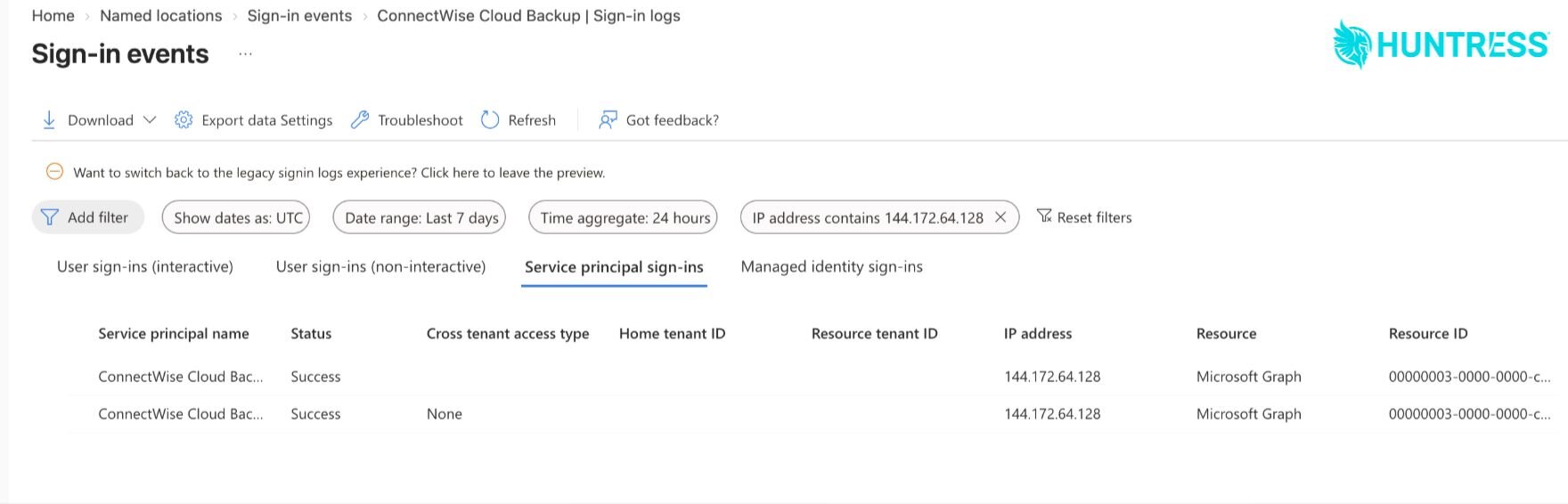
Huntress confirmed unauthorized sign-ins in 162 tenants by 19:00 UTC on October 16. Its incident report traces malicious Cloud Backup authentications on October 15 to 144.172.64[.]128, a hosting-provider address. The automated sweep moved through tenant identifiers in sorted order and requested Microsoft Graph tokens.
The observed access could reach mail and attachments, OneDrive and SharePoint files, Teams chats and directory information, depending on the permissions present in each tenant. Neither a successful token request nor the app’s broad permissions proves that data was taken. Microsoft 365’s standard logs also may not show every read performed through Graph, so the absence of visible file or mailbox activity is not a clean bill of health.
The original shutdown does not remove planted access
ConnectWise’s disabled identities stop new authentication through those connections, and the shared Cloud Backup credentials are no longer valid. Previously issued tokens can remain usable until they expire. More importantly, credentials, permissions or accounts created through a different identity must be found and removed inside each customer tenant.
Huntress saw that second problem unfold in about five minutes. The ConnectWise Cloud Management app for Microsoft Teams assigned itself the Global Administrator role, then used a Python client to add secrets to an MSP management app and a tenant-specific Huntress application. The secrets were valid until 2028. Huntress later removed the unauthorized credential on its application after observing it used for seven rapid sign-ins.
Disabling or rotating the initially compromised credential does not revoke a new secret added to another application. That is why administrators need to review application credentials and directory-role changes, not only search for the published source IP.
The seven ConnectWise application IDs to inspect
ConnectWise disabled the following identities globally, but it advises partners to verify their local enterprise-application state. Older installations may retain SkyKick names, so match the application ID rather than relying on the display name.
- Cloud Backup:
506e08f9-6e9a-4da4-942b-a099a03644ae - Cloud Management:
2399d300-6fca-4e6a-a686-399fefe75b83 - Cloud Management – MS Teams:
24205314-2b89-4e07-a2a4-579e898a5640 - Cloud Management – Exchange Online:
b78f6a77-d4e5-46fb-87e5-d1648bd02519 - Cloud Management – MS Graph:
0de14c77-b9b0-4137-9360-34878a929827 - Cloud Management – Partner Center:
412dcf96-176d-4b3a-a1b0-4981ad66971e - Cloud Management – SharePoint Online:
b2b55f5b-7758-4719-8d8f-88ae172e6bdb
What Microsoft 365 administrators should do now
- Verify the applications are disabled. In the Entra admin center, choose the correct directory, open Enterprise applications, and search by each application ID. For an affected identity that remains enabled, set Enabled for users to sign-in? to No. Record the local object ID, administrator and UTC time. Do not begin by deleting the application; its configuration is evidence, and deletion complicates a later service restoration.
- Export evidence before retention expires. Download Entra audit logs and the available interactive-user, non-interactive-user, service-principal and managed-identity sign-in records as JSON. ConnectWise recommends reviewing from October 13 through the present and extending the search to October 1 where records remain available. Entra’s normal retention can be as short as seven days on Free tenants and 30 days on P1 or P2.
- Search the service-principal logs. The normal user sign-in view will not show this activity. Filter Service principal sign-ins by all seven application IDs, then review successful and failed events, source locations, resources and correlation IDs. Search for
144.172.64[.]128, but do not treat its absence as proof that a tenant is unaffected. - Inspect directory roles and application changes. Look for a ConnectWise or SkyKick identity assigning itself Global Administrator, Exchange Administrator or another directory role. Review audit events in which one application changed another application, particularly credential additions.
- Review every application credential added since October 13. Check both enterprise applications and app registrations, giving priority to MSP management, security, backup and migration tools. Remove client secrets or certificates that your team cannot account for. Huntress warns that the useful detection signal is the combination of actor, operation and user agent, not a common Python user agent by itself.
- Check Microsoft 365 workloads and preserve their logs. Export available Purview Audit activity and preserve SIEM, storage and Microsoft Graph activity records. Investigate unexpected mailbox, SharePoint, Teams and directory access along with new consents, permissions, accounts and inbox rules.
- Keep the applications disabled. Do not reconnect or reauthorize the affected apps until ConnectWise publishes confirmed instructions. Report suspicious findings to the vendor with tenant and application identifiers, timestamps and time zones, but never include passwords, private keys or other secrets.
Plan for a backup and restore gap
The containment step creates an operational risk of its own. Scheduled Cloud Backup jobs are stopped, and ConnectWise says access to affected archives and restoration is unavailable while the investigation continues. Emails, files, Teams messages and ordinary user sign-ins continue to work, but any data created or changed during the outage may fall outside the most recent recovery point.
MSPs should identify clients with strict recovery-point objectives, active legal holds, migrations or an immediate need to restore deleted data. Record the time of the last successful backup for each tenant and document the growing gap. Avoid reconnecting the suspended service to close that gap before ConnectWise confirms that credentials have been reset and provides reauthorization steps.
The wider lesson is about application identity inventory. A dormant multi-tenant app can retain broad consent long after a customer stops actively using it. Inforcer found the Cloud Backup app installed in roughly 3,800 tenants it managed, with about two-thirds not actively using it. Regularly removing unused vendor apps, tracking their owners and permissions, and alerting when a service principal grants itself a role or changes another app can reduce the blast radius of the next vendor-credential compromise.
This story reflects public information available through ConnectWise’s October 18 advisory and researcher updates. The investigation and service status may change.