A suspected China-linked espionage group exploited a critical BeyondTrust Remote Support flaw before it was publicly disclosed, then turned the appliance into a route toward privileged credentials and downstream systems.
BeyondTrust disclosed CVE-2026-102764 on October 15. The improper-origin-validation flaw can let an unauthenticated remote attacker perform file operations on affected appliances. It carries a CVSS 4.0 score of 9.3 and affects all Remote Support releases through version 26.2.3.
The vendor had already patched its hosted service and made the BT26-05-RS patch available to self-hosted customers. But patching closes the entry point; it does not remove a web shell, reverse tunnel, altered permissions or stolen credentials from a system compromised earlier. Google Threat Intelligence Group and Mandiant traced zero-day exploitation to late August and documented the attacker’s path from an uploaded PHP file to root access, persistent administrative rights and remote sessions into internal endpoints.
Which BeyondTrust systems need action
BeyondTrust’s incident timeline says the actor exploited one BeyondTrust-hosted Remote Support instance and one self-hosted appliance on August 29. The company found the hosted intrusion during a threat hunt on September 28, contained it within 27 minutes, reproduced the entry path that evening and began building a fix. It released the patch on October 8 and completed coordinated public disclosure a week later.
Remote Support SaaS instances were patched automatically. BeyondTrust’s advisory dates completion to October 9, while its longer incident account says deployment began October 8. Customers do not need to patch the hosted appliance themselves, but organizations with evidence of suspicious activity still need to review credentials, sessions and configuration.
Self-hosted Remote Support versions 24.3.1 through 26.2.3 can receive the BT26-05-RS patch through the /appliance interface. Older installations must first upgrade to a supported release. BeyondTrust also issued a precautionary patch for Privileged Remote Access because it shares affected code, although the company says its testing has not identified a way to exploit PRA through this vulnerability.
An internet-reachable appliance that ran a vulnerable build during the exposure window deserves incident review even if it is patched now. The available evidence does not mean every exposed appliance was breached. It does mean a clean patch status alone cannot answer whether access occurred before the fix.
How the intrusion moved from a web request to root
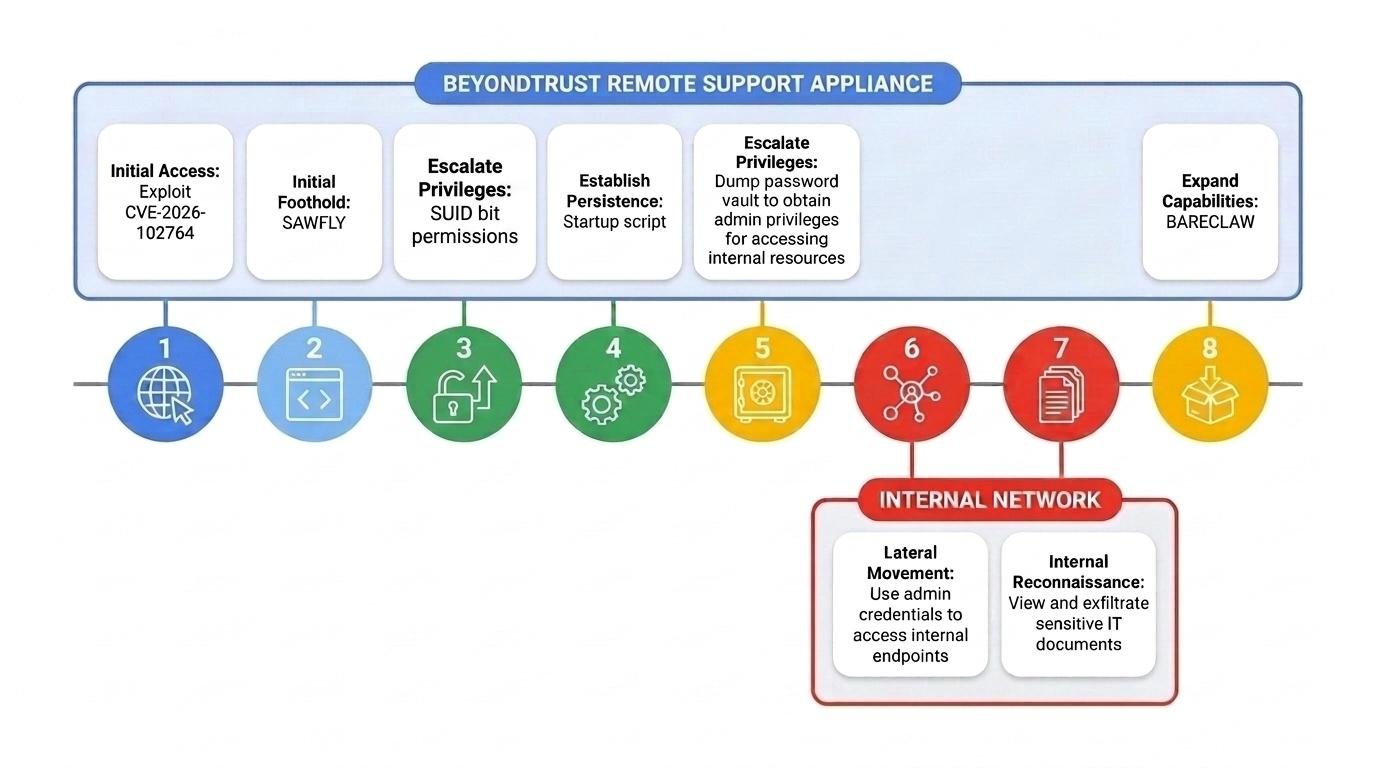
Mandiant’s technical report describes a tightly sequenced intrusion. After exploiting CVE-2026-102764, the attacker sent POST requests to /app_84304470%2Ephp. About 11 minutes later, the system recorded a PHP web shell named mangoapi.php in the site’s Laravel web root.
Mandiant named that web shell SAWFLY. It looks for an obfuscated POST parameter, _c94mfe, and returns a 404 response when the parameter is missing. That behavior helps it disappear into ordinary scanner traffic. When a valid request arrives, SAWFLY Base32-decodes the payload, decrypts it with a hard-coded RC4 key and executes the resulting PHP code.
The service account running the web shell was not root. The operator copied /bin/sh to /usr/bin/dbus-authd, changed the copied file’s owner to root and set its SUID bit. Running that disguised binary then provided root privileges.
The actor next tested BeyondTrust’s proprietary bt-secrets utility with several command forms in an apparent attempt to extract passwords, API keys and endpoint credentials from the appliance vault. It subsequently deleted bt-secrets.log and archived copies of that log.
Persistence survived a normal reboot
The intrusion did not rely only on a temporary shell. Mandiant found a startup script called zz-root-persist under /home/bomgar/sbin/post_boot.d. The script inserted a passwordless sudo rule for the site service account into /ns/config/sudoers.template, then used the appliance’s own bt-sysconfig utility to rebuild the active sudoers file.
That choice matters for recovery. An attacker who modifies a configuration template can survive a reboot or a reset that would overwrite a direct edit to /etc/sudoers. Mandiant therefore recommends rebuilding appliances with confirmed or uncertain compromise status from a clean, fully patched image instead of trying to delete a handful of known files.
The operator also removed host, web-server and application logs, including authentication, SSL, HTTP access, PHP and system message records. Organizations that forward appliance events to an external SIEM, reverse proxy or firewall have a better chance of reconstructing the activity. A local log set with unexpected gaps should be treated as evidence requiring explanation, not proof that nothing happened.
The appliance became a path to downstream systems
After taking control of the host, the actor used a compromised administrator account inside Remote Support. It changed local Jump Item and Team permissions from No Access to Administrator, granting the account the ability to launch remote sessions to systems listed on the appliance.
Mandiant observed the operator start a support session to an internal endpoint, request full file-system access and use Remote Support’s native file-transfer feature to remove documents useful for reconnaissance, including software inventories. The same workflow that lets a support team administer machines gave the intruder a trusted route past the network edge.
The attacker also installed BARECLAW, a custom C tunneler that exposes a SOCKS5 proxy over WebSockets. Its configurable options include TLS, shared-token authentication, traffic obfuscation, destination filtering and proxy chaining. Mandiant recovered it as ingredi_ws. SAWFLY and BARECLAW hashes and YARA rules are published in the Google report, but defenders should not depend on hashes alone: BeyondTrust says the actor rotates infrastructure and tooling between victims.
What administrators should check now
Use the following order to avoid destroying the evidence needed to make a sound recovery decision:
- Confirm the deployment and patch state. Identify whether Remote Support is SaaS or self-hosted, record the running version and verify BT26-05-RS installation. Self-hosted builds older than 24.3.1 must be upgraded before the patch can be applied.
- Preserve before rebooting. Snapshot virtual appliances with memory and export their disks. For hardware appliances or hosted tenants, request forensic preservation through BeyondTrust Support. Collect SIEM, WAF, reverse-proxy and firewall records covering the full period from late August onward.
- Isolate suspected systems at the perimeter. Block inbound access at the firewall and restrict outbound traffic to required update and licensing destinations. Ending sessions and disabling Jump Clients, Jumpoints and API accounts preserves more history than deleting them.
- Hunt for behavior and configuration changes. Review requests for the staging path and
mangoapi.php, the_c94mfeparameter, web-service processes spawning shells, the SUID file/usr/bin/dbus-authd,zz-root-persist, changes tosudoers.template, and unexplained Jump Item or Team permission upgrades. - Review remote-session activity. Reconcile every privileged login and support session with an administrator, ticket and expected source. Pay particular attention to consumer broadband or commercial VPN addresses, file-transfer events, new full-file-system grants and activity outside normal support windows.
- Rotate credentials in dependency order. If compromise is found, treat every secret stored, brokered or typed through the appliance as exposed. Start with appliance and application administrators, then API secrets, bind accounts, SAML signing keys, vault credentials, Password Safe or PRA integrations, SMTP and ITSM connectors, and privileged endpoint accounts.
- Rebuild when host compromise cannot be excluded. Restore from a known-clean, patched image. Use a configuration backup from before the exposure window where possible, issue a new TLS certificate and redeploy Jump Clients, Jumpoints and representative consoles.
BeyondTrust asks customers with suspected exploitation to open a severity-one support request that references BT26-05. Its threat-hunting package includes product-specific queries, while Mandiant’s report supplies file indicators and YARA rules for SAWFLY and BARECLAW.
Why patch status is only the first question
Remote-support systems occupy an unusually valuable position: they sit at the perimeter, hold privileged relationships and are designed to reach many other machines. In this incident, the attacker did not need to invent a separate lateral-movement channel after gaining control. It could abuse the product’s own administrator permissions, Jump Items, session controls and file-transfer capability.
For that reason, the decisive checks are broader than whether BT26-05-RS appears in the appliance interface. Administrators need to know whether independent logs survived, whether application permissions changed, whether unknown sessions reached endpoints and whether the credentials behind those sessions have been replaced. A patched appliance with attacker-created persistence or still-valid brokered credentials is not a recovered appliance.