



Microsoft and a group of security, cloud and law-enforcement partners have disrupted EvilTokens, a phishing-as-a-service platform linked to more than 12,000 compromised email inboxes across over 10,000 organizations worldwide.
The operation combined a civil case in the U.S. District Court for the Eastern District of Virginia with technical action against domains, hosting accounts and serverless infrastructure. Microsoft reported seizing 50 websites and disabling more than 150 additional domains, while Cloudflare removed hundreds of associated domains and Workers projects. The Metropolitan Police in the United Kingdom also arrested two men on suspicion of offenses connected to the service.
The action should reduce EvilTokens activity, but it does not eliminate device-code phishing. Similar kits and affiliate-operated copies remain available, and the attack succeeds by abusing a legitimate Microsoft authentication flow rather than stealing a password from a counterfeit login form. That makes this a useful moment for Microsoft 365 administrators to review whether device-code authentication is needed at all.
How EvilTokens turned a real Microsoft login into an attack
Device-code authentication is designed for hardware that cannot easily accept a password, including smart TVs, printers, conference-room systems and some Microsoft Teams devices. The device displays a short code, and the user enters it in a browser on another device to approve the session.
EvilTokens reversed who controlled the device asking for access. An attacker initiated the authentication request, then delivered the resulting code through a phishing email, PDF, HTML attachment or redirect chain. The victim was shown a page with the code and a button leading to microsoft.com/devicelogin.
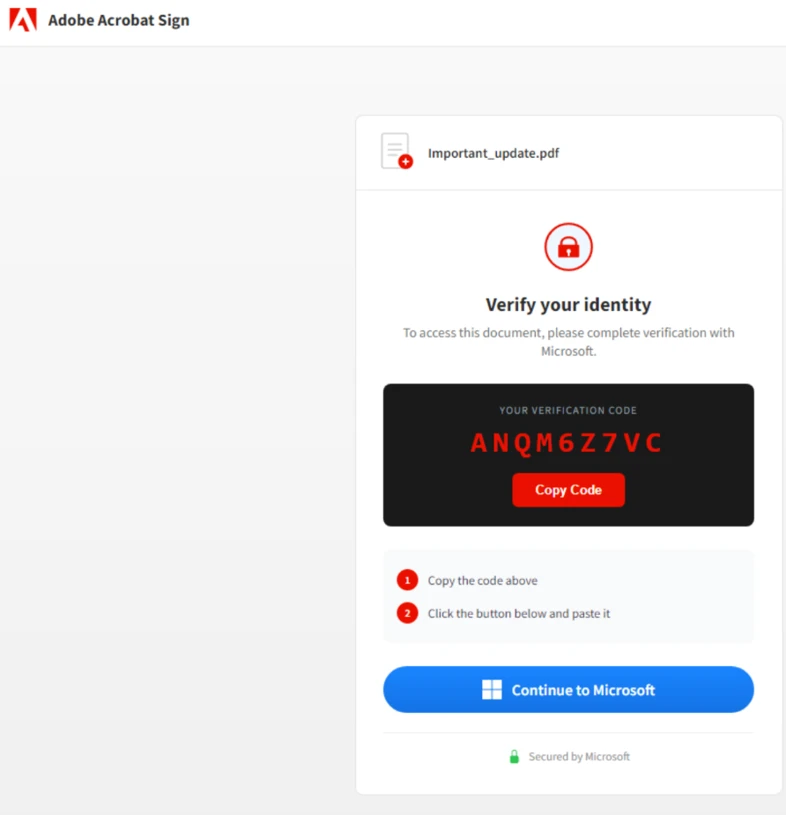
That destination is genuine. If the victim entered the code and completed the normal sign-in and multifactor prompts, Microsoft authorized the attacker’s waiting session. The victim did not hand over a password; the attacker received valid access tokens.
This is why familiar phishing advice is incomplete here. Checking the address bar can confirm that the login page belongs to Microsoft, but it cannot confirm that the session being approved belongs to the user. An unexpected device code is itself the warning.
Microsoft’s technical analysis found that EvilTokens polled its backend every three to five seconds during the code’s 15-minute lifetime to detect when a victim completed authentication. Some attackers registered a new device within 10 minutes to obtain a Primary Refresh Token, while others waited before creating hidden inbox rules or extracting email to reduce the chance of immediate detection.
The AI component began after account takeover
EvilTokens offered 44 lure themes, including invoices, requests for proposals, shared files, password-expiration notices, voicemail and electronic fax messages. It also used compromised legitimate sites, fake CAPTCHA gates and redirect logic hosted on services such as Cloudflare Workers, Vercel and AWS Lambda to complicate scanning and blocklisting.
Its more consequential AI feature operated after a mailbox was compromised. The platform could analyze email, summarize and translate conversations, map reporting lines through Microsoft Graph, identify people with payment authority and surface discussions involving invoices, wire transfers or executive correspondence. It then helped subscribers draft messages that matched existing business relationships.
That compressed several stages of business email compromise into one commercial panel. An operator no longer needed to manually read thousands of messages to learn which vendor was expecting payment or which executive could approve a transfer. EvilTokens sold the kit for a $1,500 initiation fee and $500 per month, with add-ons for sending mail, redirecting automated scanners and capturing Microsoft 365 sessions.
Microsoft tracks the developers and support operation as Storm-2992. Its investigation found victims in wholesale distribution, construction, financial services, real estate, higher education and healthcare, with the heaviest observed activity in the United States, Canada, the United Kingdom, Australia, India and France.
What the disruption removed
Microsoft’s Digital Crimes Unit and Health-ISAC filed the civil action, while infrastructure and investigative support came from organizations including Cloudflare, Coinbase, OpenAI, Railway, SpyCloud, the Shadowserver Foundation and TRM Labs. The legal action enabled domains to be suspended or transferred; Cloudflare separately removed associated zones, blocked Workers scripts and developed detections intended to prevent the same code from being redeployed.
For domains in jurisdictions where legal seizure was not practical, Cloudflare placed warning pages in front of the phishing content. The company also published detection names for EvilTokens device-code links, affiliate domains and voicemail lures.
Those measures break active infrastructure and raise the cost of rebuilding it. They do not change the underlying OAuth device-authorization flow, remove already-issued tokens from victim tenants or stop another phishing kit from copying the method. Administrators should treat the disruption as a prompt to find exposure, not as evidence that the risk has passed.
Microsoft 365 controls to check now
Block device-code authentication unless there is a documented need. Microsoft recommends using Conditional Access to block the flow wherever possible. Organizations that rely on Teams or conference-room hardware should scope exceptions to the specific resource accounts that require it rather than allowing the flow tenant-wide.
Look for the sequence, not only the lure. Useful signals include unexpected device-code authentication, anomalous Microsoft Graph activity, rapid device registration after sign-in, suspicious inbox-rule creation and unusual access from cloud-hosting infrastructure. Microsoft Defender XDR includes detections for several of these behaviors, but equivalent identity, mail and audit telemetry can be correlated in other security platforms.
Use phishing-resistant authentication. FIDO2 security keys, passkeys and certificate-based authentication provide stronger binding between the user, device and service than codes or push approvals. They should complement a device-flow policy, not substitute for one: a user can still authorize the wrong session when an unnecessary authentication path remains open.
Protect the financial workflow separately. Because the platform searched for payment conversations and trusted relationships, finance teams should verify changes to bank details or urgent transfers through a second channel. Mailbox security alone should not be the control that decides whether money moves.
What to do after a suspected device-code compromise
A password reset is not sufficient because the attacker may already hold valid access or refresh tokens. Microsoft recommends temporarily disabling the account for immediate containment, revoking sign-in sessions, forcing reauthentication and disabling any attacker-registered device. Existing access tokens can remain usable for up to an hour after ordinary session revocation, which is why a brief account disablement may be necessary.
Responders should also remove malicious inbox and forwarding rules, review new authentication methods and device registrations, inspect Microsoft Graph and Exchange activity, search sent mail for follow-on phishing and notify internal or external recipients who received messages from the account. For finance-facing users, review recent invoice, vendor and wire-transfer conversations for attempted payment diversion.
The central lesson is simple: a legitimate login page does not make an unexpected login request legitimate. Device-code authentication separates the browser approval from the device receiving access, and EvilTokens industrialized that gap. Closing the flow where it is unnecessary is more reliable than expecting every employee to recognize the trick.