Notion Mail is shutting down on September 22, 2026, and users have until September 21 to save the parts of their email workflow that exist only inside Notion’s inbox app.
The shutdown does not erase ordinary email history for Gmail-connected accounts. Notion Mail synced with Gmail, so messages that were received or sent through the app should remain in Gmail after the product goes offline. The risk is narrower but still important: drafts, scheduled emails, snippets, auto-label instructions, reminder behavior, attachments stored inside snippets, and custom inbox organization can disappear or stop updating if users leave the migration until the final week.
Notion laid out the timeline in a help center guide. Export tools opened on June 25. September 21 is the final day to save Notion Mail-only data. On September 22, the Notion Mail app for web, desktop, and iOS goes away for all plans, and unsaved Notion Mail-only data will be permanently deleted.
What Notion Mail users should save first
The most urgent items are the ones Gmail does not already hold in a normal mailbox view. If you have open drafts in Notion Mail, move them into Gmail or another email client before September 21. If you have scheduled messages, recreate or reschedule them in Gmail so they do not vanish with the Notion Mail interface.
Snippets need a separate pass. Notion says snippet text can be exported for use elsewhere, but files attached to snippets must be downloaded manually before the shutdown. That matters for sales teams, recruiters, founders, support teams, or consultants who used snippets as lightweight templates for recurring replies, proposals, calendar links, customer follow-ups, or hiring updates.
Auto-label instructions are another item worth saving. Notion Mail’s pitch was that users could describe how email should be sorted, then let Notion AI organize incoming messages into views. Those instructions can be exported to a Notion page and reused as the starting point for a Custom Agent with Gmail access, but the existing Notion Mail inbox rules will not simply become Gmail filters.
Users should also review reminders and custom views. Notion says reminders set on emails in Notion Mail will not transfer to Gmail. Custom sorting, saved views, and the way the inbox was organized also will not carry over as a working Gmail setup. Existing synced email databases and filtered views inside Notion will remain accessible, but after September 22 new emails will no longer sync into those databases.
What keeps working after the shutdown
Not every Notion email workflow is being removed. Notion says Gmail AI Connector, Mail blocks already added to Notion pages, and AI agent mail tools that connect through Gmail will continue to work after the inbox app shuts down.
That distinction is the center of the product change. Notion is not walking away from email entirely. It is removing the standalone Notion Mail client while keeping agent-driven email tools inside the broader Notion workspace. The company’s help page says users who already connected Gmail or Outlook to Notion, or who already use Notion agents for email, should not see those workflows stop just because the Notion Mail app is being retired.
For business and enterprise users, the Gmail AI Connector has extra setup requirements. Notion’s connector page says the person connecting it must be a Notion workspace owner on a Business or Enterprise plan and a Google Admin with a paid Google Workspace account. Smaller teams should check this before assuming every Notion Mail workflow can be recreated through the connector with the same permissions and cost structure.
Regulated teams have an earlier deadline
Organizations using Notion Mail in regulated environments should move faster than ordinary users. Notion specifically says teams relying on HIPAA coverage should plan to transition off Notion Mail by June 30, 2026, which leaves only a few days from this publication date to export Notion Mail-only content and check with compliance administrators.
That shorter deadline makes this less of a routine app sunset for some teams. If Notion Mail became part of a support, recruiting, patient-communication, legal, or administrative workflow, administrators should verify where email data is stored, whether snippet attachments contain regulated information, who owns exported data, and whether an agent-based replacement has the same access controls and audit expectations as the email client it replaces.
Why Notion is killing an email app it just launched
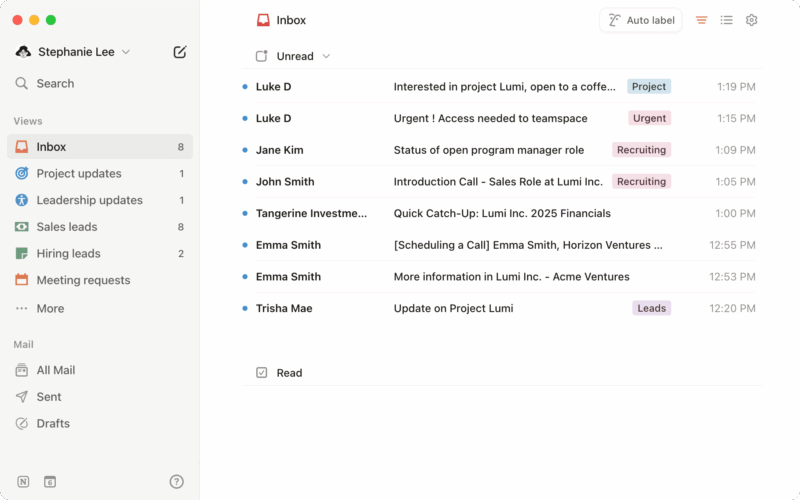
Notion Mail had a short public life. Notion acquired Skiff, a privacy-focused productivity and email startup, in February 2024. It previewed Notion Mail later that year and made the product broadly available in 2025. The app tried to make email feel more like a Notion database, with custom views, AI labels, reusable snippets, Notion-style writing tools, and calendar scheduling built into the inbox.
The company is now pointing users toward agents instead. In a post cited by TechCrunch, Notion said more than half of Notion Mail users manage emails without opening the inbox, which it used as the rationale for focusing on agents that run email workflows directly. Notion’s own help documentation makes the same product direction visible: the inbox app is going away, while Gmail-connected AI tools and agent mail actions remain.
The move also follows Notion’s broader agent push. In May, the company introduced a developer platform for agents and integrations, saying developers and coding agents could sync external data, build tools, and bring external agents into a shared Notion workspace. Notion’s release notes described the workspace as a place where teams and agents can work together across connected data, not just a place where humans open documents, calendars, and inboxes one app at a time.
A practical migration checklist
Start with a simple inventory. Open Notion Mail and look for drafts, scheduled emails, snippets, snippet attachments, auto-label instructions, reminders, and any saved views your workflow depends on. Move drafts and scheduled messages into Gmail. Export snippets and auto-label instructions. Download snippet attachments manually from Notion Mail settings. Recreate essential reminders somewhere outside Notion Mail.
Then check replacement paths. If you only used Notion Mail as a cleaner Gmail client, moving back to Gmail may be enough. If you used Notion Mail because of AI labels, snippets, and Notion page context, test whether Gmail AI Connector and Custom Agents can cover the same workflow before September. If your team depends on shared views, compliance rules, or review processes, assign an owner now rather than waiting for the shutdown banner to become urgent.
The broader lesson is that AI productivity apps are becoming less stable at the feature level even as platforms become more ambitious. Notion is betting that people will want agents to process email more than they want another inbox. Users still need to protect the ordinary work product sitting inside that inbox before the experiment ends.